
VMware Cloud Foundation
Most enterprises now operate across public and private cloud and on-premises infrastructure simultaneously. Managing the mix consistently has become one of the harder problems in IT.
The VCF Platform
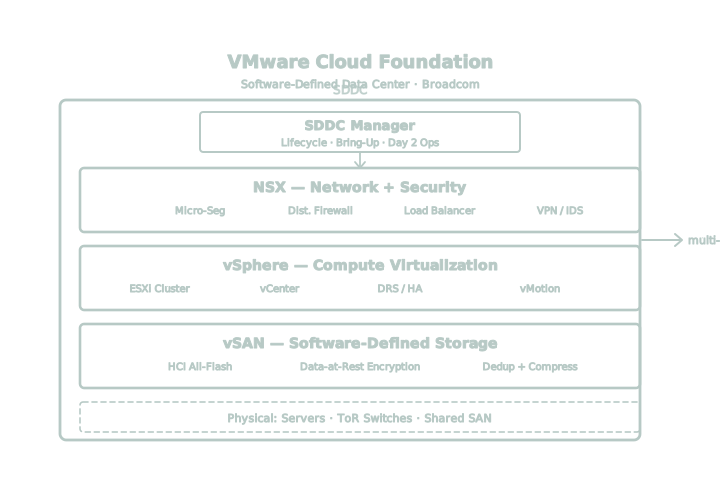
VMware Cloud Foundation (VCF) is a platform for building and operating private and hybrid cloud environments under a single, automated operating model. R2 designs, deploys, and manages VCF environments so IT teams get the automation and flexibility of cloud without giving up control.
Compute virtualization
Software-defined storage
Network virtualization + security
Monitoring, automation + lifecycle operations
Why hybrid cloud strategy
needs a different approach.
Cloud adoption over the past decade solved specific problems: slow procurement cycles, limited scalability, and rigid infrastructure. Many of those problems are solved. New ones have taken their place.
These pressures are why most organizations run hybrid cloud today, not as an interim step, but as the long-term model. The organizations that manage it well are not the ones running the simplest environment. They're the ones running a consistent one.
Cost Predictability
Cloud spend is variable by design. Without governance, costs are difficult to forecast and even harder to control after the fact.
Security Consistency
Public cloud, private cloud, and on-premises environments often use different identity models, different policy engines, and different monitoring tools. Maintaining equivalent security posture across all three takes deliberate design.
Why a hybrid cloud strategy
needs a different approach.
Cloud adoption over the past decade solved specific problems: slow procurement cycles, limited scalability, and rigid infrastructure. Many of those problems are solved. New ones have taken their place.
Workload placement decisions are made ad hoc, without a documented rationale tied to cost, performance, or compliance requirements.
Security policy is defined and enforced differently across cloud and on-premises environments.
Cost visibility exists in one environment but not the other, making budget planning unreliable.
Migrations take longer than planned because the implications of moving a workload were never fully understood before the move.
Platform and licensing decisions were made by default rather than matched to actual workload requirements.
AI and new application workloads are deployed on infrastructure chosen for convenience rather than fit.
How VMware Cloud Foundation addresses these problems.
VCF standardizes infrastructure operations across environments so the same automation, policy, and reporting apply regardless of where a workload runs. That has several practical effects.
This does not eliminate the need to choose where a workload should run. It removes the operational penalty for having made that choice, and the friction involved in changing it later.
Provisioning and lifecycle management are automated, reducing manual configuration and the drift that comes with it.
Security policy is defined once through NSX and enforced consistently across the environments VCF manages.
Operations teams get a single set of tools for monitoring, capacity planning, and cost reporting instead of separate tools per environment.
Workloads can be moved between private and public cloud with a clear understanding of the performance and cost implications, because the underlying operating model does not change.
What a VCF operating model
delivers for your team.
Consistent Operations Across Environments
The same automation, policy, and management tools apply whether a workload runs on-premises or in the cloud. Teams do not need separate expertise or separate processes for each environment.
Documented, Defensible Workload Placement
Placement decisions are based on defined criteria: cost, performance, compliance, and data requirements. When circumstances change, the reasoning behind the original decision is already known.
Standardized Security Policy
Identity, segmentation, and access policy are defined once and enforced the same way across environments, reducing the number of places security posture can drift.
Predictable Cost Management
Centralized visibility into resource usage and cost across environments supports more accurate budgeting and fewer surprises.
A Platform for AI Workloads Without Long-Term Lock-In
VCF supports GPU-accelerated infrastructure for AI workloads while keeping the underlying operating model flexible as requirements evolve. What that looks like for a given environment depends on current hardware, licensing, and roadmap, which we cover in an assessment.
Workload first, not platform.
Most infrastructure recommendations start with a platform. Before recommending an architecture, R2 evaluates what each workload actually requires: performance, latency, compliance obligations, data residency, and cost profile. That assessment determines where a workload should run and what the operating model needs to support. VMware Cloud Foundation is the platform R2 uses to execute that decision, not the starting assumption.
R2's engineers hold the certifications required to design and deploy VCF environments correctly, and every assessment includes a documented findings report before any implementation begins. Every engagement has defined milestones and success criteria that are tracked and reported on throughout the project, not just at kickoff. R2 also stays engaged after go-live: an operating model needs to be maintained as workloads, compliance requirements, and cost conditions change, and R2's managed services team monitors and adjusts the environment on an ongoing basis so it continues to reflect current requirements.
A better approach to technology service.
R2 uses a six-step services methodology adapted from U.S. military special operations doctrine: Find, Fix, Finish, Exploit, Analyze, and Disseminate (F3EAD). We advise, design, implement, and manage technology environments as a full partner, not a single-project vendor. Our engineers hold deep certifications across multiple manufacturers, and we recommend the solution that fits the client's environment, even when that is not our own product line.
Find
Assess the environment and identify what is actually constraining it.
Fix
Define the architecture and scope against documented requirements.
Finish
Deploy with certified engineers against defined milestones.
Exploit
Put the automation and policy capability of the platform to work.
Analyze
Measure performance, security posture, and cost against the benchmarks set at kickoff.
Disseminate
Report findings back to the team and adjust the operating model.
Outcomes organizations can expect.
R2 defines these benchmarks with each client at the start of an engagement and reports against them throughout.
- A documented rationale for every workload placement decision
- Consistent security policy enforcement across on-premises, private cloud, and public cloud
- Cost visibility that supports accurate forecasting before, not after, a workload moves
- A platform choice matched to actual requirements, not chosen by default
- Shorter, better-scoped migration timelines
- Infrastructure that can support current and near-term AI workloads without a full re-architecture
- Reduced manual effort in provisioning, patching, and lifecycle management
What working with R2 looks like
Engineering-Led, Not Sales-Led
R2's engineers are involved from assessment through delivery. Recommendations are based on what an environment requires, not on what is easiest to sell.
Requirements-First Architecture
Workload requirements determine the architecture. VMware Cloud Foundation is applied where it fits, not assumed as the default answer before an assessment is complete.
Defined Scope and Milestones
Every engagement has documented deliverables and success criteria, tracked and reported throughout the project.
Ongoing Accountability
R2's managed services team continues to monitor, report on, and adjust the environment after go-live.
Checklist: Evaluate your current hybrid cloud operating model.
Organizations considering VMware Cloud Foundation can use this checklist to assess current workload placement logic, cost visibility, and security consistency across their environments before scoping a project.
What is VMware Cloud Foundation (VCF)?
VMware Cloud Foundation (VCF) is an integrated platform that combines compute virtualization (vSphere), software-defined storage (vSAN), network virtualization and security (NSX), and a management layer into one system for running private and hybrid cloud infrastructure. It gives organizations a consistent way to deploy and manage workloads across on-premises and cloud environments.
R2 first evaluates workload requirements—including performance, latency, compliance, data residency, and cost—to determine whether VCF is the right fit and, if so, designs the environment around those requirements.
Why do CIOs use VMware Cloud Foundation for hybrid cloud strategy?
CIOs adopt VMware Cloud Foundation to apply one operating model, one security policy, and one set of cost controls across on-premises and cloud infrastructure instead of managing each environment separately. This reduces the operational and governance overhead of running hybrid infrastructure and gives leadership a documented rationale for where workloads run and why.
Does VMware Cloud Foundation lower cloud costs?
VMware Cloud Foundation does not automatically lower costs on its own. It supports more predictable cost management by centralizing visibility into resource usage across environments, which helps organizations forecast and control spend rather than discovering cost overruns after the fact. Actual savings depend on the current environment and how it is configured.
What components make up VMware Cloud Foundation?
VMware Cloud Foundation includes vSphere for compute virtualization, vSAN for software-defined storage, NSX for network virtualization and micro-segmentation, and a management layer for automation, monitoring, and lifecycle operations across the stack.
How is VMware Cloud Foundation different from running vSphere on its own?
vSphere alone provides compute virtualization. VMware Cloud Foundation adds integrated storage (vSAN) and networking and security (NSX) on top of vSphere, along with unified lifecycle management across all of it. Whether an environment needs the full VCF stack or a narrower configuration depends on what that environment actually runs.
Can VMware Cloud Foundation support AI and GPU-accelerated workloads?
Yes. VMware Cloud Foundation supports GPU-accelerated infrastructure for AI workloads while keeping the underlying environment on one operating model, so AI infrastructure decisions do not require a separate platform or a separate set of operational tools. The specific hardware and licensing needed depend on the AI workloads being deployed.
Does adopting VMware Cloud Foundation mean moving workloads out of the public cloud?
No. VMware Cloud Foundation is used to build private cloud on-premises, to extend consistent operations into public cloud through VMware Cloud offerings, or to operate both under one set of policies. Deciding where a specific workload runs is separate from the decision to adopt VCF.
Do we need to replace our existing infrastructure to adopt VMware Cloud Foundation?
Not necessarily. An assessment of the existing environment determines what infrastructure can be retained, what needs to change, and how to phase a transition to VMware Cloud Foundation to minimize disruption.
What is the business risk of an inconsistent hybrid cloud strategy?
Running cloud and on-premises environments with different security models, different cost visibility, and undocumented workload placement decisions increases the time and risk involved in every migration, audit, and infrastructure change. Over time, that shows up as unpredictable IT spend, inconsistent security posture, and slower response to new business or compliance requirements.
Why work with a partner like R2 instead of implementing VMware Cloud Foundation directly?
R2 evaluates workload requirements before recommending an architecture, so the platform decision is based on what an environment actually needs rather than a default recommendation. R2 also provides a documented assessment, certified engineering delivery, and ongoing managed services after deployment, which is different from a one-time product implementation.
What does an R2 VMware Cloud Foundation assessment include?
An R2 assessment reviews current workload placement, infrastructure architecture, security policy, and cost visibility across an organization's environments, and delivers a documented findings report with specific recommendations before any implementation work begins.
How long does a VMware Cloud Foundation deployment take?
VCF deployment timelines depend on the size and complexity of the environment. R2 scopes every engagement with defined phases, milestones, and deliverables before work begins, so timelines are set against the specific environment rather than estimated generically.
How does R2 support a VMware Cloud Foundation environment after deployment?
R2's managed services team monitors performance, security posture, and cost across the environment on an ongoing basis and adjusts the operating model as workloads and requirements change.
How much does VMware Cloud Foundation cost?
VMware Cloud Foundation (VCF) pricing depends on your licensing model, existing VMware environment, infrastructure requirements, and the workloads you plan to run. Costs typically include software subscriptions, hardware (if needed), implementation services, and ongoing support. Since Broadcom introduced subscription-based licensing, many organizations are also reassessing how VCF compares to maintaining separate VMware products. An assessment helps determine the most cost-effective path based on your current environment, future growth plans, and operational goals rather than relying on generic pricing estimates.
What changed after the Broadcom acquisition?
Broadcom transitioned VMware from perpetual licensing to a subscription-based model and consolidated many standalone products into VMware Cloud Foundation (VCF) and VMware vSphere Foundation (VVF). For many organizations, this changed how VMware software is purchased, licensed, and supported. It also prompted IT leaders to reevaluate their virtualization strategy, infrastructure roadmap, and long-term costs. The right response depends on your existing environment, licensing status, and business requirements. R2 helps organizations assess those factors, understand their options, and build a migration strategy that aligns with both technical and financial objectives.
Is VMware Cloud Foundation right for my organization?
VMware Cloud Foundation is a strong fit for organizations that need to manage private cloud, public cloud, and on-premises infrastructure under a consistent operating model. It is particularly valuable when security, compliance, automation, or operational consistency are priorities. However, VCF is not the right answer for every environment. The best starting point is to evaluate your workloads, infrastructure, business objectives, and licensing requirements before selecting a platform. R2 begins every engagement with that assessment so recommendations are based on your environment, not a predetermined technology.
Can I migrate to VCF without replacing my infrastructure?
In many cases, yes. Organizations can often adopt VMware Cloud Foundation using portions of their existing infrastructure, depending on hardware compatibility, software versions, and overall architecture. Some environments require upgrades or phased changes, while others can transition with minimal disruption. An assessment identifies what can be retained, what should be modernized, and the most practical migration path. R2 develops a phased implementation plan that minimizes operational risk while preparing your environment for long-term performance, security, and scalability.